Azimuthal NMO Scanner
The Azimuthal NMO Scanner applies azimuthal anisotropic NMO correction across a range of ellipticity and fast-direction values, producing a family of corrected gathers — one for every combination of the two — rather than a single output.
Scan through the resulting gathers to find the combination that best flattens the data, or use them as input to the HTI Auto Picker to derive ellipticity and fast-direction volumes automatically. Either way, the picked values can then be used as constant or volume inputs to the Azimuthal Anisotropic NMO mode of Normal Moveout Correction.
Create an Azimuthal NMO Scanner Process
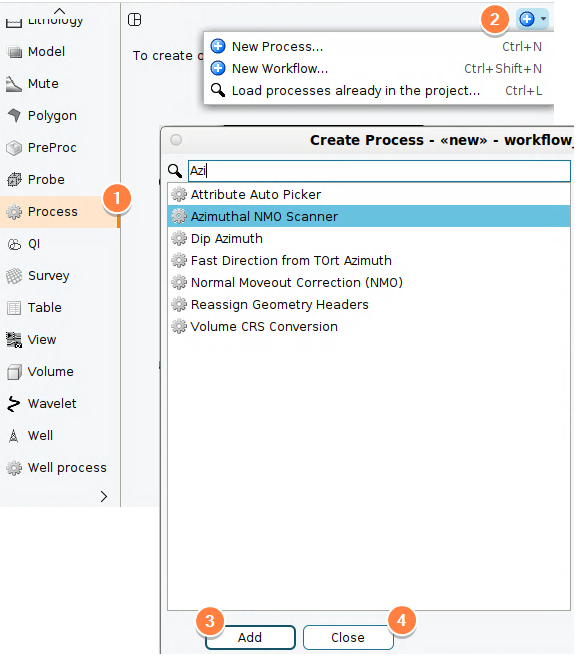
- In the Control Panel, open the Process tab.
- At the tab header, click the Add icon and select New Process.
- Search for or scroll down, and select Azimuthal NMO Scanner > Add.
- Type a name for the process and click OK and Close.
Define the scan parameters
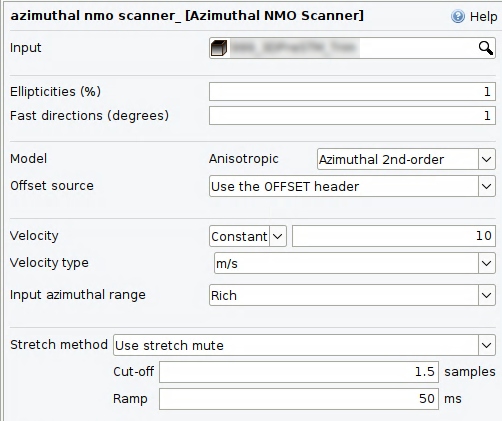
- Input: Select the migrated input gathers to be scanned. You must manually remove NMO correction from this volume prior to using this process.
- Ellipticities (%): The sequence of ellipticity percentage values (0–20%) to scan.
- Fast directions (degrees): The sequence of fast-direction azimuth values (0–179.99°) to scan.
- Model: Choose Azimuthal 2nd-order or Azimuthal 4th-order for the NMO equation.
- Offset source: Whether offset should be taken from the OFFSET header, or calculated from the source and receiver positions (SX/SY/GX/GY headers).
- Azimuth source: Available for 2D volumes only. Selects whether the Azimuth value should be calculated from the source and receiver positions (SX/SY/GX/GY headers), or taken from the OTRAV header. 3D volumes will always use OTRAV.
- Velocity: Select a velocity model, as a constant value or a volume.
- Velocity type: Select the type and unit of the velocity volume. The types and units available depend on whether the input gathers are in the time or depth domain:
- For time-domain gathers:
- Interval Velocity in Time (m/s, km/s, or ft/s)
- RMS Velocity (m/s, km/s, or ft/s)
- Depth values sampled in Time (ZT) (m, km, or ft)
- Average Velocity in Time (m/s, km/s, or ft/s)
- For depth-domain gathers:
- Interval Velocity in Depth (m/s, km/s, or ft/s)
- Average Velocity converted to Depth (m/s, km/s, or ft/s)
- Time values sampled in Depth (TZ) (ms or s)
- For time-domain gathers:
- Effective η (eta): Available when Model is set to Azimuthal 4th-order. Either a volume or a constant value for the anisotropic parameter.
- Input azimuthal range: Narrow or Rich, depending on the azimuthal content of the data used to derive the velocity model (see Normal Moveout Correction for details on this choice).
- Picking azimuth (degrees): Available when Input azimuthal range is set to Narrow. The velocity picking azimuth, as a constant or a volume. For Rich azimuthal coverage, the picking azimuth is instead derived automatically, halfway between the fast and slow directions.
- Stretch Method: Choose the stretch processing for the scanned gathers — no stretch processing, or use a stretch mute with a Cut-off and Ramp values.
Angle mute options
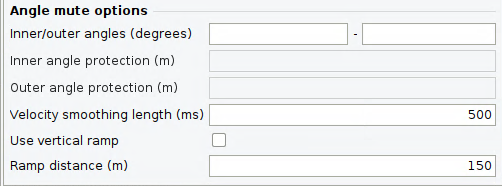
An angle mute, as used by Creating an Angle Mute, is applied to each scanned gather:
- Inner/outer angles (degrees): Input the angle for the inner and outer mutes, with acceptable values ranging between 0 and 360 degrees.
- (Optional) specify an Inner angle protection and/or Outer angle protection to apply offset-domain mutes.
- Velocity smoothing length (ms): Additional smoothing can be applied to the velocities before use.
- Use vertical ramp: When checked, taper the mute with a Vertical ramp distance instead of a Ramp distance.